Free shipping from 300,-
Guaranteed 15 days not satisfied, money-back guarantee
Ordered before 12 AM, Shipped today
25874 reviews

How to take a screenshot on a computer.


screenshot maken

Which keyboard shortcuts work for screenshots?

Taking a screenshot on your computer is easy using keyboard shortcuts. For Windows users, the most common shortcut is **PrtScn** (Print Screen). This allows you to take a picture of your entire screen. If you only want to capture an active window, press **Alt + PrtScn**. For macOS users, the combination **Shift + Command + 4** is useful, allowing you to select an area of your screen to capture. With **Shift + Command + 3** you take a screenshot of the entire screen.

desktop vs laptop

How do you take a screenshot in Windows and macOS?

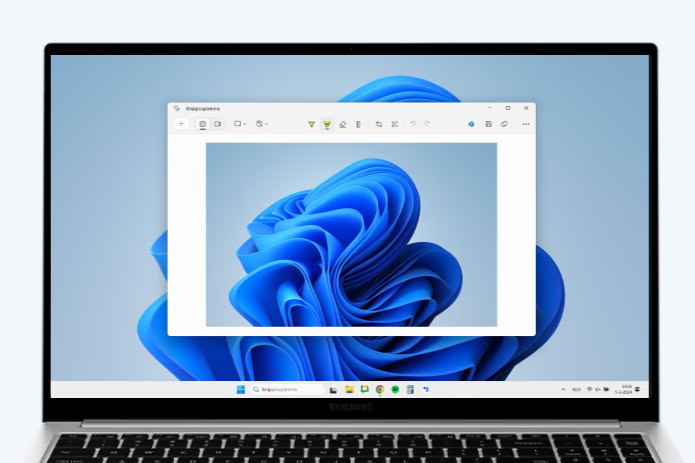
In Windows you can take a screenshot by pressing **PrtScn**. The image is then copied to the clipboard, after which you can paste it into a program like Paint. For a more direct option you can use **Windows key + Shift + S**, which allows you to directly select and save an area. In macOS you can use **Shift + Command + 4** to select and save a part of your screen to your desktop. For a full screenshot use **Shift + Command + 3**, where the file is also saved directly to the desktop.


Buy Refurbished Desktop
schermafbeeldingen maken

Why screenshots are useful

Screenshots are useful for capturing important information, such as an error message, an image from a website, or a section of a document that you want to share. They make it easy to quickly save and share visual information, without the need to copy text or manually write everything down. Screenshots are also useful for providing technical support, as you can provide a visual representation of what you see on your screen.


Desktop Advice
Banner top-10 aanbiedingen

LOOKING FOR THE BEST DEALS?

Check out our current offer!

View the deals
Banner top-10 aanbiedingen

LOOKING FOR THE BEST DEALS?

Check out our current offer!

View the deals

Buy a PC

HP EliteDesk 800 G6 USFF - Intel Core i7-10e Generatie - 8GB RAM - 256GB SSD - Windows 11
Condition:
Click for more information.

HP EliteDesk 800 G6 USFF

Intel Core i7-10th Generation - 8GB - 256GB - Win 11
Old Price €481.25 €385.00 €318.18
HP EliteDesk 800 G6 USFF - Intel Core i5 10th Generation - 16GB RAM - 256GB SSD - Windows 11
Condition:
Click for more information.

HP EliteDesk 800 G6 USFF

Intel Core i5-10th Generation - 16GB - 256GB SSD - Win 11
Old Price €511.25 €409.00 €338.02
HP EliteDesk 800 G6 USFF - Intel Core i3-10th Generation - 8GB RAM - 256GB SSD - Windows 11
Condition:
Click for more information.

HP EliteDesk 800 G6 USFF

Intel Core i3-10th Generation - 8GB RAM - 256GB SSD - Win11
Old Price €331.25 €265.00 €219.01
HP EliteDesk 800 G6 USFF - Intel Core i7 10th Generation - 16GB RAM - 256GB SSD - Windows 11
Condition:
Click for more information.

HP EliteDesk 800 G6 USFF

Intel Core i7-10th Generation - 16GB RAM - 512GB SSD - Win11
Old Price €611.25 €489.00 €404.13
HP EliteDesk 800 G6 USFF - Intel Core i5-10th Generation - 8GB RAM - 256GB SSD - Windows 11
Condition:
Click for more information.

HP EliteDesk 800 G6 USFF

Intel Core i5-10th Generation - 8GB RAM - 256GB SSD - Win11
Old Price €381.25 €305.00 €252.07
HP EliteDesk 800 G5 USFF - Intel Core i5 9th Generation - 16GB RAM - 256GB SSD - Windows 11
Condition:
Click for more information.

HP EliteDesk 800 G5 USFF

Intel Core i5-9th Generation - 16GB - 256GB SSD - Win 11
Old Price €456.25 €365.00 €301.65
.