
Turn off Find My iPhone.
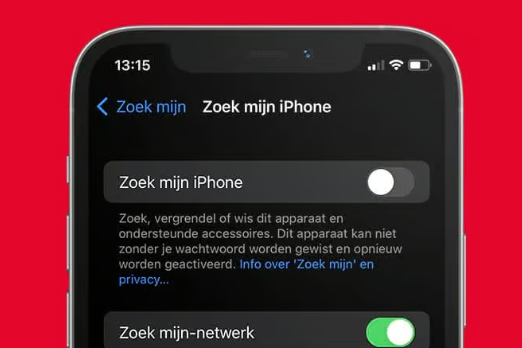
How to disable Find My iPhone?
To disable Find My iPhone, follow these steps:
- Open the Settings app on your iPhone.
- Tap your name at the top and go to iCloud.
- Select Find My iPhone.
- Turn off the switch next to Find My iPhone.
- Enter your Apple ID password to confirm.
After disabling, the function is deactivated, and your iPhone can no longer be tracked via your Apple ID.
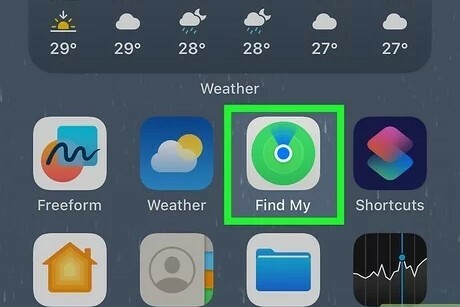
Why disable Find My iPhone?
Disabling Find My iPhone is sometimes necessary in the following situations:
- When selling or trading in: Before transferring your iPhone, this function must be disabled.
- Repair: Some repairers require the function to be off.
- Transfer of ownership: To prevent the new owner from experiencing restrictions.

What to do when selling your iPhone?
When selling your iPhone, it is important to follow these steps:
- Disable Find My iPhone as described above.
- Log out of your Apple ID via Settings > [Your Name] > Sign Out.
- Erase all data by going to Settings > General > Reset > Erase All Content and Settings.
Conclusion: Disabling Find My iPhone is essential when selling, repairing, or transferring ownership. Make sure you follow all steps to securely delete your data.
iPhone Advice


Buy iPhone
Condition: Matomas naudotas

Condition: Tvarkinga būklė
Apple iPhone 15 Pro - 128GB - 2 Year Warranty
6.1 inch - 15_zwart_titanium
Old Price €861.25 €689.00 No VAT
Condition: Tvarkinga būklė

Condition: Tvarkinga būklė
Apple iPhone 16 Pro Max - 256GB - 2 Year Warranty
16_desert_titanium
Old Price €1,306.25 €1,045.00 €1,045.00
Condition: Tvarkinga būklė
Apple iPhone 15 Pro Max - 256GB - 2 Year Warranty
6.7 inch - 15_zwart_titanium
Old Price €1,073.75 €859.00 €859.00
Condition: Tvarkinga būklė
Apple iPhone 15 Pro - 256GB - 2 Year Warranty
6.1 inch - 15_zwart_titanium
Old Price €956.25 €765.00 €765.00